Sunday, March 29, 2015

Dapper - A Simple ORM

Entity Framework

Entity Framework is a full featured ORM. This is nice when performance is not important but rapid development is. Coding Linq statements instead of stored procedures can speed implementation dramatically.

EF's ease of use has trade-offs. All the behind the scenes work means slower performance and frustrating gotchas. Occasionally EF's generated SQL differs from the desired result. This inevitably necessitates a greater understanding of EF's inner workings. At that point it's just easier to write your own SQL.

Dapper

Dapper is a Micro-ORM. It focuses on simplifying database interactions with extension methods for query and execute commands. It also auto-maps values to POCO objects.

That's more or less it. Because Dapper's not managing relationships and data in memory its performance is an order of magnitude better.

According to Dapper's Github Page, “Select mapping over 500 interactions and POCO serializations” section:
  • Hand Coded: 47ms
  • Dapper: 49ms
  • Entity Framework: 631ms

There is almost no performance hit because Dapper doesn't do too much.

Stored Procedure Example

Let's write code to return a list of Diamond Club Members from a Stored Procedure.

Here's our POCO:

private class Member
{
    public string Guid {get;set;}
    public string Name {get;set;}
    public string MemberType {get;set;}
}

Let's look at an ADO.NET example:

private IEnumerable<Members> GetAllDiamondClubMembers()
{
    using (var sqlConnection = new SqlConnection(connectionString))
    using (var sqlCommand = new SqlCommand(
        "dbo.GetAllMembers", sqlConnection){
             CommandType = CommandType.StoredProcedure }) {

        sqlCommand.Parameters.Add("@MemberType", SqlDbType.VarChar)
            .Value = "DiamondClub";

        sqlConnection.Open();

        var sqlDataReader = sqlCommand.ExecuteReader();

        var members = new List<Members>();

        while(sqlDataReader.Read())
        {
            members.Add(new Member
            {
                Guid = sqlDataReader["Guid"],
                Name = sqlDataReader["Name"],
                MemberType = sqlDataReader["MemberType"]
            });
        }

        sqlConnection.Close();

        return members;
    }
}

In the above example we are:
  1. Creating a SQL Connection
  2. Creating a SQL Command
  3. Loading the SQL Command
  4. Opening the SQL Connection
  5. Executing the Stored Procedure
  6. Iterating through the returned values
  7. Mapping each individual value
  8. Closing the connection
  9. Returning the results

Dapper dramatically simplifies this:

private IEnumerable<Members> GetAllDiamondClubMembers()
{
    IEnumerable<Members> results;

    using (var sqlConnection = new SqlConnection(connectionString))
    {
        sqlConnection.Open();
        results = sqlConnection.Query("dbo.GetAllMembers", 
            new { MemberType = "DiamondClub" },
            commandType: CommandType.StoredProcedure);
    }

    return results;
}

Now we:
  1. Create the SQL Connection
  2. Open the SQL Connection
  3. Run the Query
  4. Return the results

Dapper has taken care of most of the rudimentary details for us. This is a healthy compromise between Entity Framework's performance hit and ADO.NET's code requirements.

Saturday, March 28, 2015

Microsoft Unity IoC Container

SOLID

Because we’re following SOLID code design we should have:
  • Small classes
  • Concrete classes that implement interfaces (with very few exceptions)
  • Any interactions with a concrete class should be done using the interface
  • Classes that other classes depend on should be injected into them during instantiation (preferably using the constructor)

A natural outgrowth of these rules is IoC.

IoC

IoC stands for Inversion of Control. It’s a byproduct of the Dependency Inversion principal. Instead of classes higher in the dependency chain determining what concretion of a class they should be using, a separate context determines which concretions get used.
This is confusing so let’s take a look at some sample code.

public class A
{
    public void LogIt()
    {
        var log = new Log();
        log.LogMe("I'm not testable!");
    }
}

public class Log
{
    public void LogMe(string message)
    {
        Console.WriteLine(message);
    }
}

In this example A creates an instance of Log and calls the LogMe method. A is Higher on the dependency chain and determines which class to use to call the LogMe method.

This is bad for a few reasons:
  • I can’t test A desperately from Log. For larger classes and more dependencies this makes unit testing impossible. As the different possibilities pile up (code paths or combinations) testing become exponential.
  • If I want to change A's use of Log but preserve Log in it's current form (if other classes use Log) I am forced to modify A as well. This is especially frustrating if I want to call LogMe still.

Let’s take a look at a more maintainable code base:

public class A : IA
{
    private readonly ILog _log;
 
    public A(ILog log)
    {
        _log = log;
    }

    public void LogIt()
    {
        _log.LogMe("A is now testable!");
    }
}

public interface IA
{
    void LogIt();
}

public class Log : ILog
{
    public void LogMe(string message)
    {
        Console.WriteLine(message);
    }
}
 
public interface ILog
{
    void LogMe(string message);
}

The above example's code has increased some because we inject a concrete instance of Log as an interface ILog into A. A is now not in charge of determining what concrete implementation of ILog is used. We've also created interfaces for both A and Log.

This is:
  • Testable: I can test A and Log separately.
  • Swappable: If I need to I can specify a different concretion of ILog with no modification to A.

Notice that the concreate implementation of ILog is injected into A’s constructor and the interface ILog is private inside of A. This is called Constructor Injection.

There’s also a concept called Property Injection where a class exposes its dependencies as public properties. This is not a good idea as other classes could change your dependencies.

Enter MS Unity IoC Container

This leaves us with a problem. How do we organize and assemble all these classes together? In particular, if we have lots of small classes that call each other there’s going to be a lot of work done up front.

You can manually assemble the classes when your application first starts but it quickly becomes chaos and hard to read.

How do we avoid the mess that manually assembling dependencies together creates? Inversion of Control (IoC) Containers to the rescue.

IoC Containers provide a framework for organizing and managing dependencies inside your application. We will be using Microsoft Unity IoC Container in this example to assemble our dependency chain.

Let’s take a look at some code:

public static void AssembleDependencies()
{
    var unityContainer = new UnityContainer();

    unityContainer.RegisterInstance<ILog>(new Log());
    
    unityContainer.RegisterType<IA, A>(
        new InjectionConstructor(
            container.Resolve<ILog>()
        )
    );
}

RegisterType tells Unity to create a new instance of the concrete class anytime one is needed. In our example if A get's used multiple times Unity will create new instances each time.

RegisterIntance tells Unity to create and use only one instance for a specific lifetime. More often then not you will only need one instance of a logger (Log) for your application so here RegisterInstance only creates one.

This is kind of like the difference between using a Factory design pattern and a Singleton design pattern:
  • Factory is a creational pattern which uses factory methods to deal with the problem of creating objects without specifying the exact class of object that will be created.
  • Singleton is a design pattern that restricts the instantiation of a class to one object.

RegisterType is a kind of Factory pattern with more capability. You use it when a new instance of a class is needed each time that class is used.

RegisterInstance is a kind of Singleton pattern with more capability. You use it when you only want one instance of a class in the whole application. However, you can also tell Unity when you want to expire the class and create a new one as well.

unityContainer.RegisterInstance<ILog>(new Log());

I used RegisterInstance for Log. In most applications you will only need one instance of a Logger. In this case we create the instance of Log and associate it with ILog. Now anytime unity is asked to resolve ILog it will create a concrete implementation of Log and return it as ILog.

unityContainer.RegisterType<IA, A>(
    new InjectionConstructor(
        container.Resolve<ILog>()
    )
);

I used RegisterType for A. Since A will be created more than once we want to give Unity instructions about what to inject into it and not actually create an instance now. InjectionConstructor is what keeps track of what dependencies should be injected into the constructor of A.

Note that we can now inject A in another class by resolving IA:

new InjectionConstructor(
    container.Resolve<IA>()
)

We've has only scratched the surface of Microsoft Unity IoC capabilities but I hope I've provided you a good start to developing more manageable code bases.

Thursday, March 26, 2015

Web API 2 Message Handlers and Filters

Message Handlers

Custom Message Handlers


Custom message handlers are used for cross cutting concerns like logging or authorization.

Lets look at the Message Handler Pipeline we will be building:


HttpServer gets the initial message from the network. FooHandler and LogEverythingHandler are custom handlers created for our cross cutting concerns. HttpRoutingDispatcher functions as the last handler in the list responsible for sending the message to the HttpControllerDispatcher. The HttpControllerDispatcher then finds the appropriate controller and sends the message to it.

Let’s take a look at some code:

public class FooHandler : DelegatingHandler
{
    private readonly IBarProvider _provider;

    public FooHandler(IBarProvider provider)
    {
        _provider = provider;
    }

    protected async override Task<HttpResponseMessage> SendAsync(
        HttpRequestMessage request,
        System.Threading.CancellationToken cancellationToken)
    {           
        if (_provider.DoesRequestContainBar(request))
        {
            return await base.SendAsync(request, cancellationToken);
        }

        var response = request.CreateErrorResponse(HttpStatusCode.BadRequest, 
            "Request does not contain bar.");

        return response;
    }
}

The following 3 rules need to be followed to create a custom message handler:
  1. Your class must inherit from the DelegatingHandler class.
  2. You must implement the SendAsync class.
  3. You must call base.SendAsynch to pass the message to the next custom message handler.

If we wanted to we could create another class to log every request to our API.

In order to tell Web API that we want these custom message handlers added to the pipeline we need to add some code the WebApiConfig class.

public static class WebApiConfig
{
    public static void Register(HttpConfiguration config)
    {
        config.MessageHandlers.Add(new FooHandler());
        config.MessageHandlers.Add(new LogEverything());
    }
}

Execution Order

With our custom message handlers added to the pipeline the following becomes the order of execution:
  • HttpServer
  • FooHandler
  • LogEverything
  • HttpRoutingDispatcher
  • HttpControllerDispatcher

This illustrates how custom message handlers give us the ability to apply general rules to all the messages coming into our API’s.

Filters

This quote beautifully illustrates the difference between Handlers and Filters:

“The major difference between their two is their focus. Message Handlers are applied to all HTTP requests. They perform the function of an HTTP intermediary. Filters apply only to requests that are dispatched to the particular controller/action where the filter is applied.”

Filters get applied to the individual controllers using attribute tags above a class or method.

Global Exception Filters

We can add exception filters to controller methods.

Let’s take a look at the following Filter and corresponding Controller.

public class UnauthorizedFilterAttribute : ExceptionFilterAttribute
{
    public override void OnException(HttpActionExecutedContext context)
    {
        if (context.Exception is UnauthorizedException)
        {
            context.Response =
                new HttpResponseMessage(HttpStatusCode.Unauthorized);
        }
    }
}

public class ProductsController : ApiController
{
    [UnauthorizedFilterAttribute]
    public Baz GetBaz(int id)
    {
        throw new UnauthorizedException("This method is not authorized.");
    }
}

In the above example UnauthorizedFilterAttribute is decorating ProductsController’s GetBaz method.

This gives us a clean separation between exception handling and controller logic. This also allows us to reuse the exception filter.

However, we can also make our exception filters global.

public sealed class GlobalExceptionFilterAttribute : ExceptionFilterAttribute
{
    public override void OnException(
        HttpActionExecutedContext httpActionExecutedContext)
    {
        if (httpActionExecutedContext != null)
        {
            if (httpActionExecutedContext.Exception is FooException)
            {
                var fooException = 
                    httpActionExecutedContext.Exception as FooException;
                httpActionExecutedContext.Response = 
                    new HttpResponseMessage(fooException.Code)
                {
                    Content = new StringContent(fooException.Message)
                };
            }
            else
            {
                httpActionExecutedContext.Response =
                    new HttpResponseMessage(
                        HttpStatusCode.InternalServerError)
                {
                    Content = new StringContent("There was a problem!")
                };
            }
        }
    }
}

Our GlobalExceptionFilterAttribute inherits from the ExceptionFilterAttribute. It also has only one overridden method named OnException. This class handles the response that should be sent back to the client.

public sealed class GlobalLogFilterAttribute : ExceptionFilterAttribute
{
    public override void OnException(
        HttpActionExecutedContext httpActionExecutedContext)
    {
        if (httpActionExecutedContext != null)
        {
            Logger logger = new Logger();
            logger.Error("There was an exception: {0}",
                httpActionExecutedContext.Exception.Message);
        }
    }
}

In the case of the GlobalLogFilterAttribute we can handle logging errors.

We now have a mechanism to:
  • Log exceptions at the controller level
  • Handle Errors that arise from the controller level

If all of our controller methods have the same logging and client exception response needs we've saved lots of coding. We've also ensured that fixes to the logging and client exception response don’t get partially implemented across only some controllers.

How do these “Global” exceptions get applied?

public static class WebApiConfig
{
    public static void Register(HttpConfiguration config)
    {
        config.MapHttpAttributeRoutes();

        config.Filters.Add(new GlobalLogFilterAttribute());
        config.Filters.Add(new GlobalExceptionFilterAttribute());
    }
}

Inside the WebApiConfig class the HttpConfiguration has a global filter list that can have custom Filters added to it.

Thursday, April 17, 2014

Unit Testing using Moq and Microsoft Fakes

Your code should be unit tested. Most of the time this is a straight forward process. Using Dependency Injection, and tools like Moq can get you 90% of the way there.

In this article I will be outlining the very basics of Unit Testing using Moq, Microsoft Test Tools, Microsoft Fakes and cover a problem with Fakes where obscure .NET Framework Class Library classes aren’t accessible.

Stubs

Stubs provide a substitute concretion for interfaces used in code that requires testing. Following the Dependency Inversion Principal outlined in SOLID code design:

  1. High-level modules should not depend on low-level modules. Both should depend on abstractions.
  2. Abstractions should not depend on details. Details should depend on abstractions.

Let’s look at an example:

public interface IBar
{
   string WhatDoISay();
}

public class Bar : IBar
{
   public string WhatDoISay()
   {
       return "barbar";
   }
}

The class Bar contains the method WhatDoISay which returns a string. Our interface IBar contains the contract for the method WhatDoISay. Any class that inherits from IBar must implement WhatDoISay or the compiler will throw an error.

public class Foo
{
   public string Speech { get; set; }

   public void Run(IBar bar)
   {
       Speech = bar.WhatDoISay();
   }
}

Foo takes in the interface of IBar as a parameter. Since an interface cannot be instantiated it must be a pointer to a concrete class that implements IBar’s method, in particular WhatDoISay. After calling WhatDoISay the returned result is written to the Console.

Finally we have the entry point of the application, Program.

class Program
{
   static void Main(string[] args)
   {
       IBar bar = new Bar();

       Foo foo = new Foo();
       foo.Run(bar);

       Console.WriteLine(foo.Speech);
       Console.ReadLine();
   }
}

Program creates an instance of Foo and Bar. It then passes bar into Foo’s Run method and display’s its Speech property.

The result is to display “barbar.”


Let’s test this.
  • Right click on your Solution and select Add -> New Project.
  • In the left side project tree navigate to Visual C# -> Test.
  • Select Unit Test Project and give it a name, preferably the project name with .Test at the end.
  • Click Ok.


We now have a Test Project.


Before we can start testing our class Foo we have to add a reference to the project where it’s located.

Right click on Reference in the Solution Explorer and Select Add Reference….


Select Solution -> Projects -> TestApp and click OK.


Let’s create a file where the testing will take place.

Right click on the project, select Add -> Unit Test… and rename the file to FooTest.cs.


using System;
using Microsoft.VisualStudio.TestTools.UnitTesting;

namespace TestApp.Tests
{
   [TestClass]
   public class FooTest
   {
       [TestMethod]
       public void TestMethod1()
       {
           
       }
   }
}

TestMethod1 is where we will put our code to Test Foo but first let’s name it something a little more appropriate.

[TestMethod]
public void WhatDoISay_ReturnAValidString_RunsCorrectly()

Since we will have many tests for each method inside of our class we should be specific about the name of the method to be tested, input and or important details and the expected outcome.

For our first unit test we want to make sure a different string is written to the console. Let’s create a Stub class that will output a different string, then make sure that string was set to the Property Speech in Foo.

public class FakeBar : IBar
{
   public string WhatDoISay()
   {
       return "fakebarbar";
   }
}

Now let’s set up our test.

[TestMethod]
public void WhatDoISay_ReturnAValidString_RunsCorrectly()
{
   Foo target = new Foo();

   FakeBar fakeBar = new FakeBar();

   target.Run(fakeBar);

   Assert.AreEqual(target.Speech, "fakebarbar");
}

We create the “target” to test, which in this case is an instance of Foo, instantiate FakeBar, pass it into the target’s Run method and Assert that target’s Speech property got set to our desired string.

What if we want to track the number of times WhatDoISay got called? It should be simple enough to add a counter to the FakeBar class and increment it every time WhatDoISay gets called.

[TestClass]
public class FooTest
{
   [TestMethod]
   public void WhatDoISay_ReturnAValidString_RunsCorrectly()
   {
       Foo target = new Foo();

       FakeBar fakeBar = new FakeBar();

       target.Run(fakeBar);

       Assert.AreEqual(target.Speech, "fakebarbar");
       Assert.AreEqual(fakeBar.NumberOfTimesWhatDoISayGotCalled, 1);
   }
}

public class FakeBar : IBar
{
   public int NumberOfTimesWhatDoISayGotCalled = 0;

   public string WhatDoISay()
   {
       NumberOfTimesWhatDoISayGotCalled++;
       return "fakebarbar";
   }
}

I now want to test what happens when I throw an error. I have to create another FakeBar that’s WhatDoISay method throws an exception. At this point it should be obvious this gets messy very, very quickly. This is where Moq comes in.

Moq is Mocking Framework that provides capable stubs with features accessed using lambda statements. Not only does this make designing stub behavior easy, it also makes your code more readable.

Let’s rewrite our last example using Moq.

In our Test project right click on References and select Manage NuGet Packages….


Type Moq in the upper right corner search field. When the search is done click on the Install button next to “Moq: an enjoyable mocking library” and close it.

We now have a reference to our Moq library.


Let’s get started.

Add using Moq; to the top of your test file.

using System;
using Moq;
using Microsoft.VisualStudio.TestTools.UnitTesting;

namespace TestApp.Tests

We’re going to do a few things in the code below:
  • Replace FakeBar with its mock.
  • Setup the desired behavior when WhatDoISay is called.
  • Pass its object into target’s run method.
  • Check the number of times WhatDoISay gets called.

[TestMethod]
public void WhatDoISay_ReturnAValidString_RunsCorrectly()
{
   Foo target = new Foo();

   Mock<IBar> barMock = new Mock<IBar>();
   barMock.Setup(m => m.WhatDoISay()).Returns("fakebarbar");

   target.Run(barMock.Object);

   Assert.AreEqual(target.Speech, "fakebarbar");
   barMock.Verify(m => m.WhatDoISay(), Times.Once());
}

One extra line of code in the method to get rid of our FakeBar class implementation.

Let’s test what happens when we throw an exception.

[TestMethod]
public void WhatDoISay_ThowsAnException_ExceptionCaught()
{
   Foo target = new Foo();

   Mock<IBar> barMock = new Mock<IBar>();
   barMock.Setup(m => m.WhatDoISay()).Throws(new Exception());

   bool exceptionCaught = false;
   try
   {
       target.Run(barMock.Object);
   }
   catch
   {
       exceptionCaught = true;
   }

   Assert.AreEqual(exceptionCaught, true);
   barMock.Verify(m => m.WhatDoISay(), Times.Once());
}

Again, no extra class had to be created to throw the exception and we are still free to see the results.

Shims
What happens when you have code that has not been interfaced out? Interfacing every .NET Framework Class library would be time consuming and annoying. It would also overly complicate your code base.

Let’s take a look at this in action.

public class Baz
{
   public bool DoesDirectoryExist { get; set; }

   public void Run()
   {
       string path = "C:\\temp\\";
       DirectoryInfo directoryInfo = new DirectoryInfo(path);
       DoesDirectoryExist = directoryInfo.Exists;
   }
}
   
class Program
{
   static void Main(string[] args)
   {
       Baz baz = new Baz();
       baz.Run();

       Console.WriteLine(baz.DoesDirectoryExist);
       Console.ReadLine();
   }
}

Baz calls DirectoryInfo’s Exists method and stores the value in its DoesDirectoryExist property.

DirectoryInfo is now a dependency whose behavior we can’t control because:
  • It was not interfaced out.
  • It was not injected.

What if we want to test DirectoryInfo throwing an Exception? Microsoft Fakes to the rescue.

“Microsoft Fakes help you isolate the code you are testing by replacing other parts of the application with stubs or shims.”

Let’s create shims of the .NET Framework System library.

Right click on the System library under Reference and select Add Fakes Assembly.
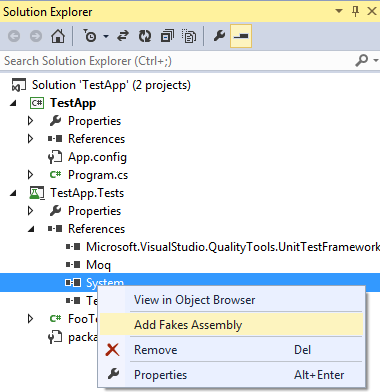


It will take a few moments to generate your fakes.


You will now have 2 new libraries under References:
  • mscorlib.4.0.0.0.Fakes
  • System.4.0.0.0.Fakes

We also have a Fakes folder containing:
  • mscorlib.fakes
  • System.fakes

More on those later.

In our test class we have to add a new using: using Microsoft.QualityTools.Testing.Fakes;

Let’s take a look at our new Test Method.

[TestMethod]
public void GetDirectoryExists_ThowsAnException_ExceptionCaught()
{
   Baz target = new Baz();
           
   bool exceptionCaught = false;
   try
   {
       using (ShimsContext.Create())
       {
           System.IO.Fakes.ShimDirectoryInfo.ConstructorString = (x, y) => { };
           System.IO.Fakes.ShimDirectoryInfo.AllInstances.ExistsGet = _ =>
           {
               throw new Exception();
           };

           target.Run();
       }
   }
   catch
   {
       exceptionCaught = true;
   }

   Assert.AreEqual(exceptionCaught, true);
}

ShimsContext provides a context in which out custom shim functionality applies.

The ShimDirectoryInfo.ConstructorString specifies what we want to happen when the constructor is run. In this example we don’t want anything to happen.

Finally! We get to our desired test case. The ShimDirectoryInfo.AllInstances.ExistsGet is where we specify that calling Exists will throw the exception. Notice the AllInstances in the lambda expression? This means every instance of DirectoryInfo will behave in this way. Be careful when shimming a class that is used more than once. It may require more work in the lambda method.

Where the hell is System.IO.Path?

I ran into this annoying problem with Microsoft Shims and Fakes.

One more code example:

public class Qux
{
   public string FilePath { get; set; }

   public void Run()
   {
       string fileName = "a.pdf";
       string path = "C:\\a\\";

       FilePath = Path.Combine(path, fileName);
   }
}

class Program
{
   static void Main(string[] args)
   {
       Qux qux = new Qux();
       qux.Run();

       Console.WriteLine(qux.FilePath);
       Console.ReadLine();
   }
}

Qux uses Path.Combine to smooth over any missing slashes when combining parts of a path.

Let’s go unit test this.


Where the hell is Path? What about FileInfo’s Extension method?


It turns out when MS Fakes goes through and shims a library it doesn't shim every class. Any methods not shimmed on the first try have to be specified somewhere else.

Path is a static class and FileInfo’s Extension method is inherited from its base class, FileSystemInfo.

Remember our .fakes files?


mscorlib.fakes and System.fakes are XML files that allow you to specify any extra classes you need shimmed.

<Fakes xmlns="http://schemas.microsoft.com/fakes/2011/">
 <Assembly Name="mscorlib" Version="4.0.0.0"/>
</Fakes>

Let’s add our Path and FileSystemInfo classes to mscorlib.fakes, save and compile.

<Fakes xmlns="http://schemas.microsoft.com/fakes/2011/">
 <Assembly Name="mscorlib" Version="4.0.0.0"/>
 <ShimGeneration>
   <Add FullName="System.IO.Path"/>
   <Add FullName="System.IO.FileSystemInfo"/>
 </ShimGeneration>
</Fakes>
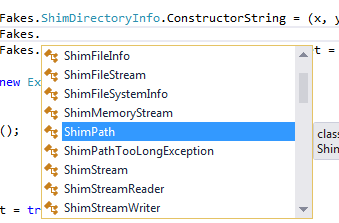


Now we can shim Path and FileSystemInfo till our hearts’ content.